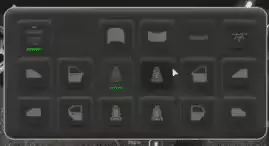
Vehicle Control UI lets players control their vehicle with the mouse instead of commands. While sitting in a car, bike or other vehicle, a key press opens a panel with buttons for the engine, doors, windows, interior light and seats. It uses no framework API.
Features
- Engine on/off (ignition) with an “Engine On” / “Engine Off” notification
- Open and close each door separately (front left, front right, rear left, rear right)
- Open and close hood and trunk
- Roll each of the four windows up or down
- Toggle the interior light
- Move to a free seat: driver, front passenger, rear left or rear right
- Engine, hood and trunk buttons are only active for the driver and front passenger
- Opens with control 81 (the “next radio station” key,
.by default); other scripts can open and close the panel through the exportsOpenUIandCloseUIor the client eventcarcontrol:open
Requirements
- mythic_notify (used for the engine notifications)
Installation
- Copy the
carcontrolfolder into your resources. - Add
ensure carcontrolto your server.cfg after mythic_notify. - To use a different key, change the control number in
client/Client.lua; theTogglevalue inConfig.luais not read by the script.



