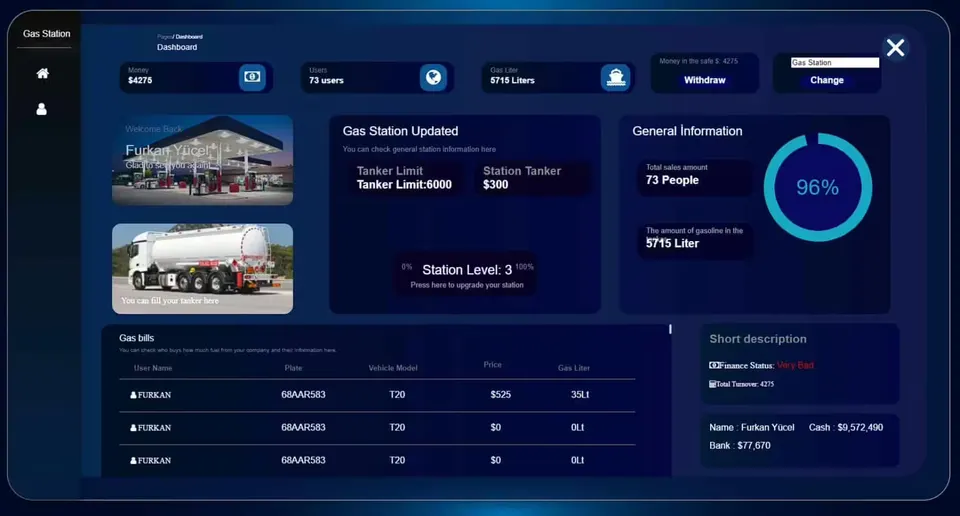
Gas Station Simulator (frkn-fuelstation) lets players buy and run gas stations on ESX and QBCore servers. Owners keep their station supplied with a tanker, manage workers and money in a management UI, and customers can only buy fuel at stations that have an owner.
Features
- See which vehicle is getting gas from you.
- Company information, finances, total earnings and the number of customers in the management UI.
- Check the gasoline in your tanker; the tanker can only be filled with the tanker vehicle.
- Three levels: as your level increases, your tanker tank gets bigger.
- After buying a gas station, an animated tour shows you around the station.
- Employee page to view and recruit workers; hired workers can still do other jobs. Only owners can add or remove workers.
- If a gas station has no owner, nobody can buy gas there.
- A station that already has an owner cannot be bought, and each player can own only one station.
- Change the name of your gas station and withdraw money from its safe.
- Transfer your company to an employee.
Requirements
- ESX or QBCore (separate folders for each)
- mysql-async
- PolyZone, progressBars and a notification resource (included in the download)
Installation
- Pick the
esxorqbfolder and copyfrkn-fuelstationand the included helper resources into your resources. - Adjust
config.lua. - Ensure PolyZone, progressBars and the notification resource, then add
ensure frkn-fuelstationto your server.cfg.
The download also contains a second, separate gas station set for ESX (esx_fuel and esx_gasstation, English and Portuguese).



