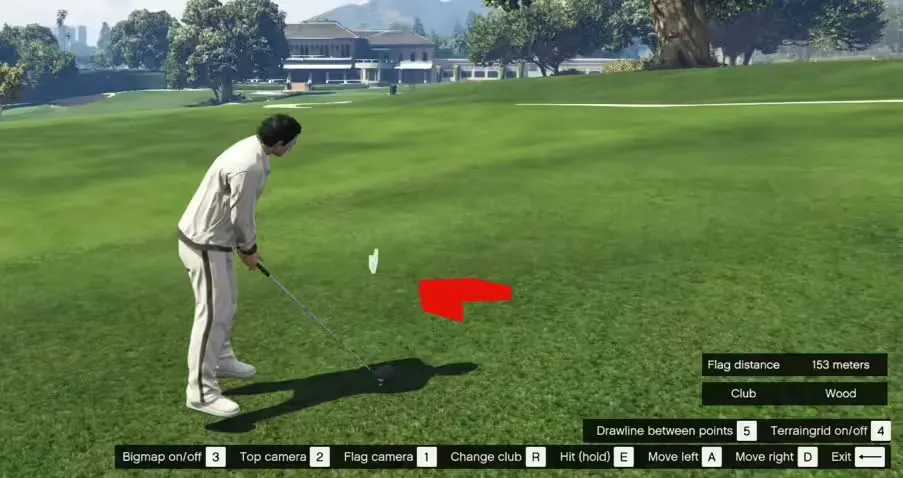
A golf minigame for FiveM that comes in two versions: one for ESX and one standalone, where the ball is spawned with a command. It works best for community events where organizers tell players where to place the ball and which flag to hit, or just for fun.
Features
- Four ball types: white, yellow, green and pink.
- Four clubs (wood, iron, wedge, putter) with their own strength and swing animations.
- Distance display to the selected flag and for the current hit.
- Leaderboard that saves each player’s longest hit in MySQL; command (
golfboard) and number of players shown (10 by default) are configurable. - Different ball behavior on different ground materials, with sound and particle effects.
- Terrain grid to check slopes, plus camera views for the flag, a top view and a big map.
- Optional wind: direction and speed change the ball flight, and a colored marker shows the current wind strength (red = strong, blue = weak). Wind is off by default; the author could hardly hit anything with it on

Config options
- Wind force and tree leaf hits (stop the ball) on or off.
- Club strengths (changing the defaults is not recommended).
- Ground slowing speed and player rotation speed.
- Keybinds for hit, aim, club change, cameras and exit.
- Leaderboard on or off.
- Whether the GTA
weapon_clubis required (off by default; the script removes it from the hand while you play because it attaches its own club). - Locales: English and Hungarian (ESX version).
Good to know
- You can only select your own ball and spawn one ball at a time; spawning again deletes the old ball.
- There is no automatic scoring or winner calculation.
- The standalone version spawns the ball through one server-side event, so it can be adapted to other frameworks.
- Known issue: after a ball lands and you select it again, nearby players sometimes see you rotated strangely around the ball.
Requirements
- mysql-async (both versions)
- ESX v1 final (ESX version only)
Installation
- Use either the
ESX_versionor theStandalonefolder and copy it into yourresourcesfolder (you can rename the folder). - Import the included
golf.sql: it creates thegolfhitstable; the ESX file also adds the four golf ball items. - Add
ensurewith the folder name to your server config.



