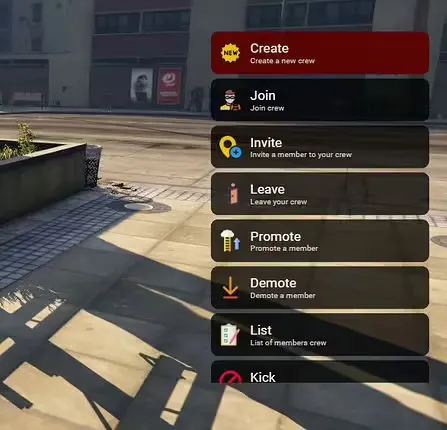
Crew System lets players create a crew and invite friends. Police can use it to coordinate pursuits, EMS to see where their ambulances are, and taxi drivers to check who is closest to a call. On PvP servers it works for clans or guilds, with an optional ranking of the best crews by kills.

Features
- Standalone, no framework configuration needed. ESX and standalone folders are included.
- A player can be part of one crew.
- Three positions per crew: owner, manager and member. Only the owner can promote a member to manager.
- The owner and managers can invite or kick players.
- Optional: crew members see each other’s names above their heads.
- Optional: blips on crew members, so everyone in the crew sees their positions in real time on the map and minimap.
- Optional: limit the script to certain coordinates, so it only works within a radius of those points.
- Optional: a ranking that sorts crews by kills.
- Crews and rankings are saved in the database. The script creates its tables automatically, no SQL file needed.
- Includes the IconMenu resource used for the interactive menus.
- Not IP-locked. The Vue source of the UI is included if you want to change it.
- All commands and texts can be changed in
Config.lua.
Commands
/crew– opens a menu with all the options below/createcrew NAME– create a crew/invitecrew– invite someone to your crew/joincrew– join a crew you’ve been invited to/leftcrew– leave your crew/provecrew– promote someone in your crew/demotecrew– remove someone’s promotion/listcrew– list the members of your crew/kickcrew– kick someone from your crew/deletecrew– delete your crew/rank– show the crew ranking
Requirements
- mysql-async
Installation
Copy icon_menu and CrewSystem into your resources folder and put the following lines in your server.cfg:
ensure icon_menuensure CrewSystem
The script creates its database tables on first start. A crew organized by the police is shown in the screenshots of the original release.



